When an athlete joins your gym, it’s a new beginning for everyone. The athlete has found a new place to practice their sport (or even try it for the first time), and your gym has a new child or young adult to train.
With any new situation you encounter, the more information you have, the better equipped you will be to navigate the scenario—and running a cheer gym is no different. While you need to collect information about your athletes to train them appropriately and provide the resources they need, your athletes and their families also need to be aware of your gym’s policies and any responsibilities they have as part of your organization.
That’s why cheer registration forms are so important. They inform your staff, your athletes, and your cheer families so everyone can work together to make the cheer season a success. This guide will help you create effective cheer registration forms by covering the following:

Cheer Registration Form FAQs
What is a cheer registration form?
A cheer registration form is an onboarding document that All-Star gyms, recreational programs, and school squads use to collect the data needed to enroll an athlete for a season, camp, or clinic. These forms align cheer gyms and cheer families to ensure everyone is on the same page about gym policies, payment requirements, and each athlete’s needs.
Why are cheer registration forms important?
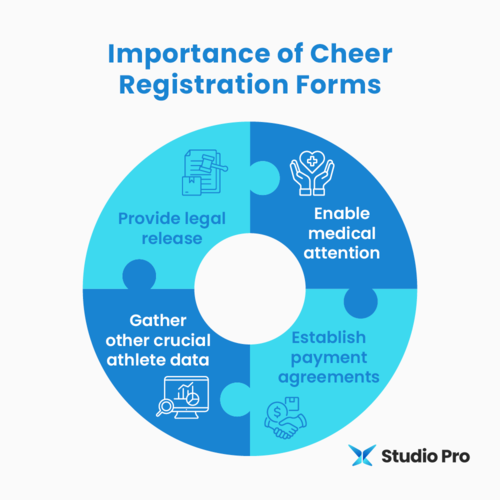
Cheer registration forms are important because they accomplish the following:
-
Provide legal release. Cheer is a high-risk sport. By explaining the associated risks in your cheer registration form and having parents or guardians sign to assume those risks, you can avoid liability. You may also add a media release to your form that allows parents or guardians to consent to the use of photos and videos of their child in your marketing materials.
-
Enable medical attention. Since cheer comes with many risks, injuries are common. If an athlete becomes injured at your gym, you’ll want to act as quickly as possible. Your cheer registration form allows you to obtain consent to treat athletes if parents or guardians are unreachable. Additionally, you can collect allergy and chronic condition information, enabling you to communicate it to medical professionals in case of an emergency.
-
Establish payment agreements. You likely collect multiple payment installments for registration, tuition, and incidentals. By explaining your payment structure in your cheer registration form, you provide transparency upfront and allow families to understand the full cost of attendance.
-
Gather other crucial athlete data. The more you know about your athletes, the smoother their experience with your gym will be. Cheer registration forms allow you to collect information like birth dates, clothing sizes, and mastered skills that help you better group your athletes, train them appropriately, and provide the resources they need.
What should a cheer registration form include?
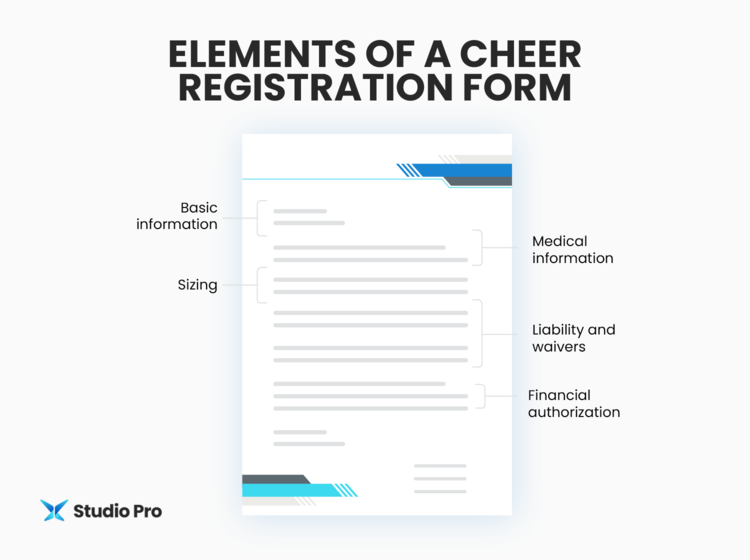
A comprehensive cheer registration form should include the following elements:
Basic Information
Every cheer registration form should collect basic information like:
-
Athlete and parent or guardian names. Collecting athlete and parent or guardian names allows you to address clients and file their forms appropriately.
-
Athlete birth date and grade level. To place athletes in the correct group, you must know their age. If they’re registering for an All-Star team, you’ll need their birth year to place them in the correct age division according to USASF.
-
Parent or guardian contact information. Recording parent or guardian phone numbers, email addresses, and physical addresses allows you to contact them.
-
Emergency contact information. You should also collect contact information for someone who isn’t a direct parent or guardian for each athlete in case parents or guardians are unreachable in an emergency.
Medical Information
Since stunting and tumbling expose athletes to the risk of injury, you should collect medical information that allows you or any medical professionals to deliver the proper care if needed. This information may include:
-
Allergies and chronic conditions. For example, create checkboxes for asthma, heart conditions, seizures, and allergies so you’re aware of any medical risks athletes may be prone to. Leave space for parents and guardians to list any procedures they typically follow to help their child in a medical flare-up or emergency, such as administering epinephrine for an allergic reaction.
-
Insurance details. Having the affected athlete’s insurance information, such as the provider name, policy number, and group number, on hand can help treatment run smoothly.
-
Consent to treat. If an emergency happens when a parent or guardian isn’t immediately reachable, their consent to treat allows you or medical professionals to provide the care the athlete needs as soon as possible.
Sizing
Make it easy to order cheer uniforms by collecting sizing information like:
-
Chest, waist, hip, and girth measurements. Since cheer uniforms are typically custom-fitted, you’ll need each athlete’s specific measurements. You may also measure athletes yourself.
-
Shoe size. Indicate whether the sizing for the shoes your gym uses is Adult or Youth so they can choose the correct size for their athlete.
-
T-shirt, spandex, and sports bra sizes. Gather sizing for practice wear in case you’re looking to order any for your athletes.
Liability and Waivers
As we’ve mentioned previously, there are risks associated with cheerleading, and you don’t want your organization to be held liable in a costly lawsuit. Keep cheer families informed and have them sign off on:
-
Risk acknowledgment. Clearly list the physical risks associated with cheer, including stunting, tumbling, and tosses. You may consult a lawyer to ensure your liability waiver is legally sound.
-
Media release. Allow parents or guardians to give (or prevent) permission for you to use photos and videos of their athlete on your marketing channels.
-
Athlete and parent or guardian code of conduct. Include policies for how cheer families should behave and represent your gym. These may include social media rules, practice etiquette, and competition day sportsmanship, along with the consequences for violation.
Financial Authorization
A strong cheer registration form secures payment right away. Provide a schedule of all fees collected throughout the year and their due dates. This way, cheer families know exactly what they’re agreeing to pay and when. You should also integrate your form with your billing software so you can automatically collect payments.
Best Practices for Creating a Cheer Registration Form
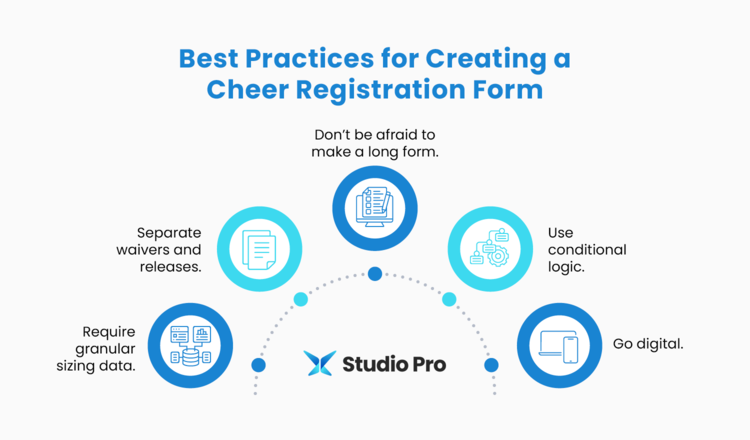
In addition to including the elements discussed above, consider these best practices when developing your cheer registration form:
-
Require granular sizing data. As mentioned before, custom-fitted cheer uniforms require precise measurements. While you can collect these measurements during practice, having parents or guardians do it themselves can save precious practice time.
-
Separate waivers and releases. Bundling all waivers or legal releases together may weaken them in court. Instead, require a distinct signature or initial for each area, such as your liability waiver, consent to treat, media release, parent code of conduct, and financial authorization.
-
Don’t be afraid to make a long form. While shorter forms are often better for user experience, cheer registration forms are an exception. Especially for All-Star gyms, signing up for cheer is a significant financial and time commitment. If you require cheer families to peruse your gym’s policies and associated fees during the registration process, you ensure they’re fully informed before officially signing up, reducing mid-season churn.
-
Use conditional logic. That said, there are measures you can take to ensure you only collect necessary information from each athlete and avoid wasting their time. Conditional logic allows you to configure your cheer registration form to show or hide questions based on the user’s previous answers. For example, if you have one registration form for all athletes, you can use conditional logic to display different fields for those who sign up for recreational classes versus your competition team.
-
Go digital. Gone are the days of physical forms. By using cheer registration software, you can digitize the process, making it easier for families to complete and for your gym to store and use this information. For example, when you leverage digital forms, parents or guardians can upload photos of their athletes’ insurance cards and birth certificates. They can also set up Auto-Pay so they don’t have to worry about manually submitting tuition each month, ensuring your gym receives reliable, timely payments.
5 Cheer Registration Form Templates
With the basics of cheer registration forms in mind, let’s explore some templates you can use to start onboarding new athletes as soon as possible.
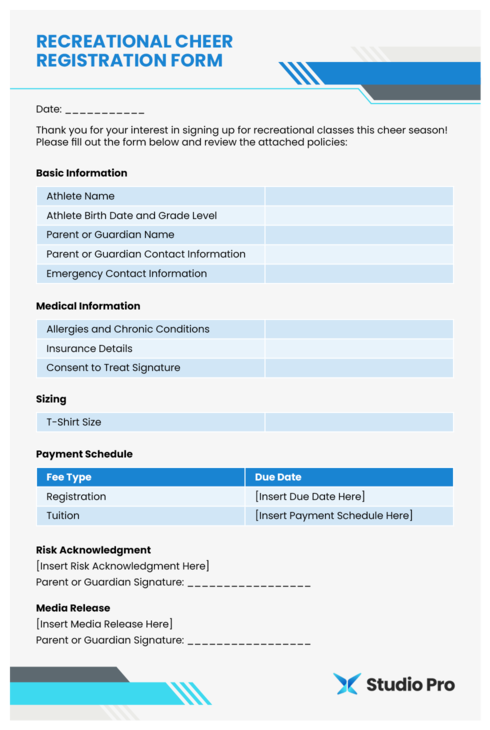
1. Recreational Cheer Registration Form
Recreational cheer registration forms are all about ease of use and logistics. Since recreational cheer is lower-commitment, you won’t need as much in-depth information. Instead, you can focus on collecting parent or guardian contact information, basic t-shirt sizing, and payment details.
Here’s what this form might look like:
2. All-Star Cheer Registration Form
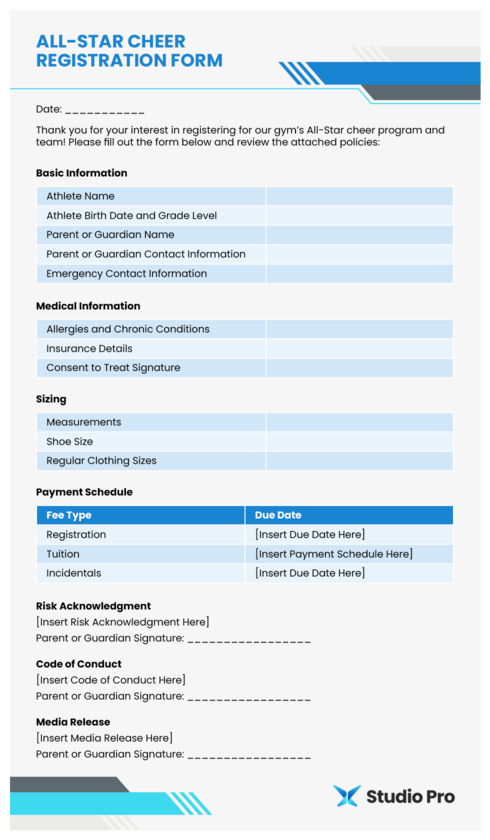
On the other hand, an All-Star cheer registration form should focus more heavily on liability protection and financial commitment. This should be a detailed document with your gym’s policies, fee structure, birth certificate upload, USASF compliance signatures, and auto-pay set-up.
This form might look something like this:
3. Cheer Camp Registration Form
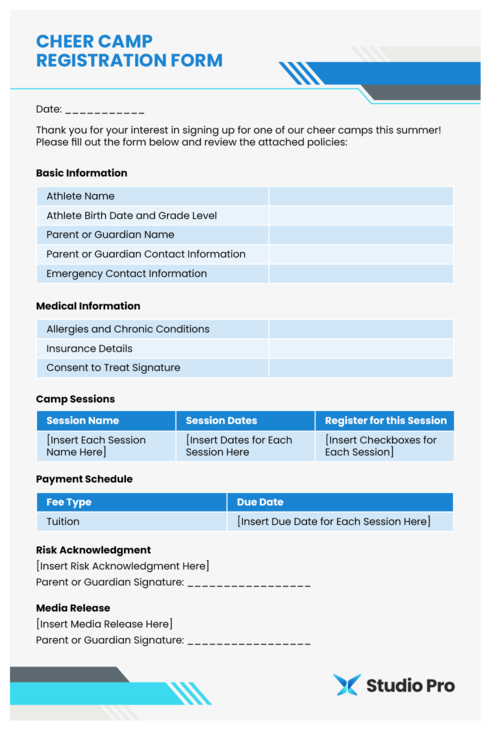
Since a cheer camp registration form is for a shorter period of time, the key here is speed and immediate payment. It should be a shorter form that focuses on collecting athletes’ contact details, medical information, and tuition.
Check out this example:
4. Cheer Clinic Registration Form
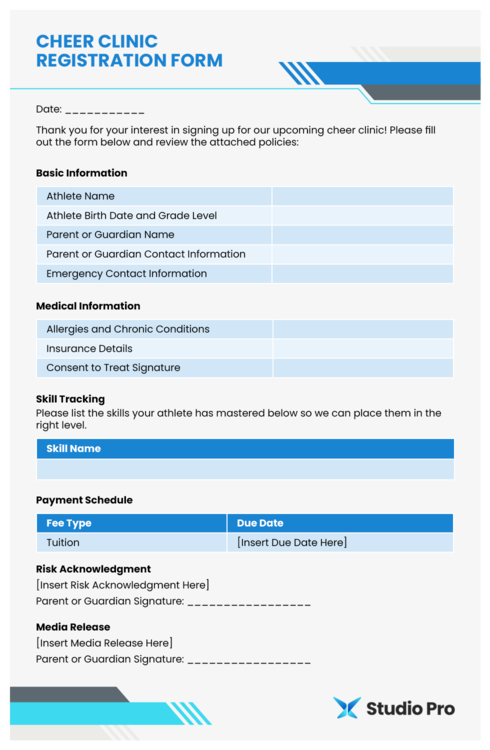
A cheer clinic registration form is similar to a cheer camp registration form, including many of the same basic fields. But because clinics often focus on building specific skills, your cheer clinic form may ask for more information about each athlete’s current skill level.
Take a look at an example:
5. Open Gym Registration Form
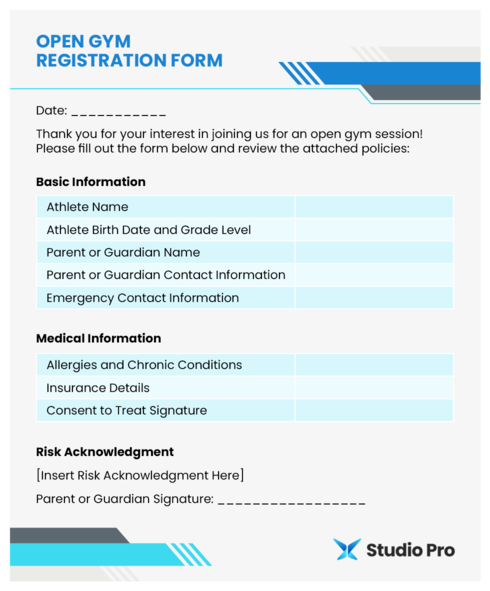
Lastly, an open gym registration form is for athletes visiting your facility for a one-time open gym session. In this case, you might not know the athletes signing up, and it’s crucial that you collect their medical information and consent to treat in the event of an emergency.
Consider offering a form like the one below via QR code at your front desk:
Cheer Registration Form Assessment
Already have your cheer registration forms in place? Use the checklist below to assess your current forms and their adherence to the best practices we’ve discussed in this guide.
Simplify Cheer Registration with Studio Pro
With the right cheer registration form, you can collect all necessary athlete information, keep cheer families informed, and provide the best (and safest) experience possible. Use our templates to get started so you can focus less on logistics and more on making your gym a great place to be.
To streamline the registration process, leverage Studio Pro’s registration software. Our system makes it easy for cheer families to sign up and pay online, removing traditional bottlenecks and ensuring you receive payments on time. If you’re ready to explore everything our registration solution has to offer, sign up for a free 30-day trial today.
For more information on how to improve the experience your cheer gym provides, check out these additional resources:
.png?width=760&height=346&name=Cheer%20Registration%20Form_Large%20CTA%20(1).png)

.png?width=800&name=Cheer%20Registration%20Form_Feature%20(1).png)